CTCL adapter monitoring.
Know before your clients do.
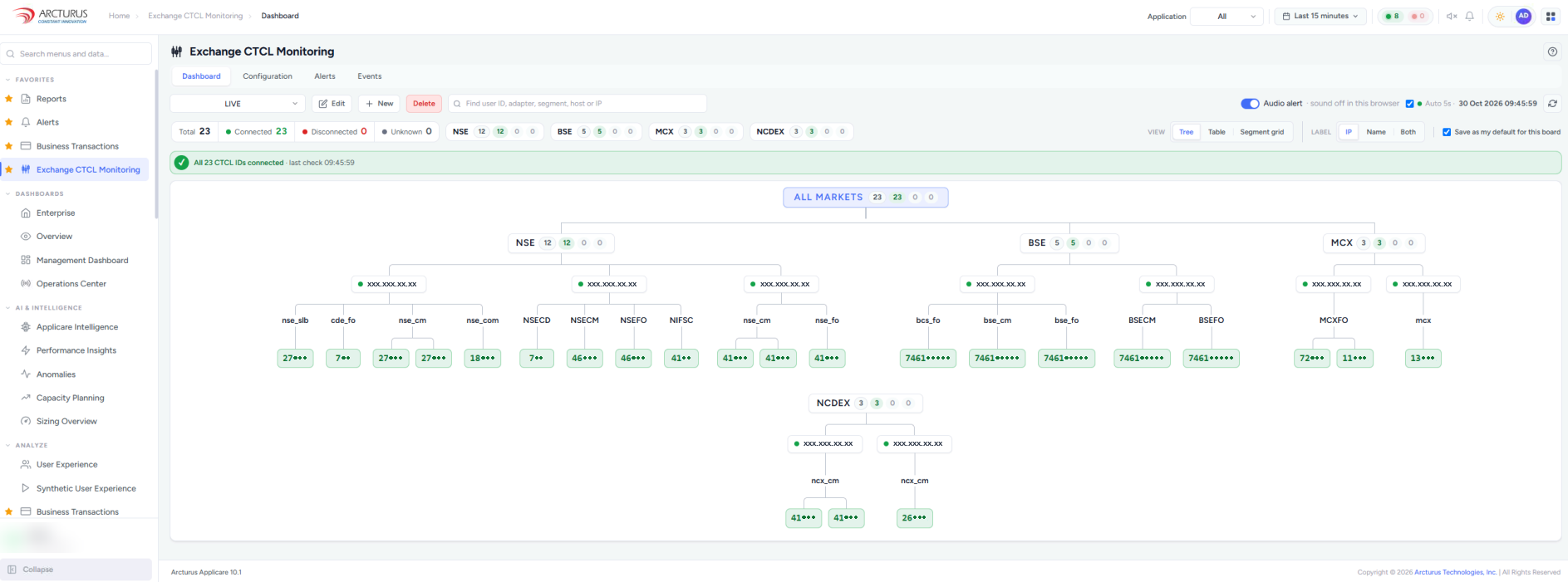
When a CTCL connection to the exchange drops, everyone trading through it is stuck. Applicare shows every CTCL ID across every exchange in one live view, flags a disconnection the moment it happens, and records how long it lasted.
A dropped CTCL session is a trading outage.
CTCL (Computer-to-Computer Link) is how a broker's own trading front end connects to the exchange. Each CTCL ID carries orders for a segment: equity cash, F&O, currency, commodities. If one disconnects in market hours, the people using it cannot trade on that segment, and too often the operations team hears about it from a dealer or a client.
Server health checks don't catch it. The server can be up, the adapter process running, and the session to the exchange still gone. You need to watch the connection itself, per CTCL ID.
Every exchange, every server, every CTCL ID.
Flagged at once, with how long it has been down.
See it step by step in the two-minute walkthrough: CTCL Adapter Monitoring with Applicare.
The same platform watches the whole trading stack.
CTCL monitoring is part of Applicare, not a separate tool. The same agent watches the trading servers, applications and databases behind each adapter, and Applicare's AI finds the cause when something goes wrong, proposes the fix, and applies it once your team approves. Then it offers to handle the same problem automatically next time. How that works, in three minutes.
For brokers in India, the same data supports SEBI's LAMA requirements: application, hardware, database and network metrics collected continuously. Observability for brokerage firms in the age of LAMA.
CTCL monitoring, answered.
What is CTCL monitoring?
It is watching the live connection between a broker's trading front end and each exchange, per CTCL ID, so that a disconnected session is seen and alerted on at once, rather than reported by a dealer or client.
Which exchanges does Applicare cover?
NSE, BSE, MCX and NCDEX, across their segments (for example cash, F&O, currency and commodities), in one view.
How is this different from server monitoring?
A server can be healthy and the adapter process running while the session to the exchange is down. Applicare checks each CTCL connection itself and shows its status per ID, alongside the server it runs on.
What happens when an adapter reconnects?
The alert clears itself and records how long the disconnection lasted, and the event stays in the history of disconnections and recoveries.
Does it help with SEBI LAMA?
Yes. The same Applicare agent collects the application, hardware, database and network metrics LAMA asks brokers to track. See our LAMA article.
How do we try it?
Ask for a CTCL monitoring demo, or start with the 48-hour health check on your own systems.
See your own CTCL estate in one view.
We will show you CTCL monitoring live and how it would look on your adapters, or put Applicare on your systems for a 48-hour health check.