From “what broke”
to “already fixed”.
Where we are taking IT operations, and why it is safe: Applicare sees your estate, ArcIn explains what went wrong, and Applicare fixes it, earning the right to fix things on its own one problem at a time, under rules your team sets.
Watching, then explaining, then fixing.
Most operations teams still work the way monitoring was designed a decade ago: dashboards, alert rules, and senior engineers on a call correlating five tools by hand. The next step is a platform that tells you why. The step after that is a platform that fixes it and proves the fix worked.
See it. Explain it. Fix it.
Applicare
See itApplications, databases, Kubernetes, VMs and cloud, through a single agent. Every service, host, container and dependency is discovered automatically and kept as one live graph of what depends on what, with no CMDB to maintain.
ArcIn
Explain itAsk in plain English, right inside the console: “is anything wrong?”, “why is checkout slow?”. ArcIn walks the graph and returns the root cause with the evidence behind it, ranked by urgency, in under a minute.
Operations automation
Fix itApplicare's AI detects the problem, proposes the fix and asks for approval. Once approved, it applies the fix, verifies it, and offers to apply the same fix automatically next time. It is built into Applicare and does not require ArcIn.
Autonomy you grant one fix at a time.
Nobody should hand production to a black box. So Applicare doesn't ask for blanket trust. It earns it, problem by problem:
- Detect. Applicare spots the problem against each component's own baseline, without hand-written alert rules.
- Suggest. It names the cause and proposes a fix, written as a runbook your engineers can read.
- Approve. A person reviews it and clicks Run. Nothing changes before that.
- Apply and verify. Dry run first, then the change, then a check that the problem has actually gone. One click undoes it.
- “Do this automatically next time?” Say yes, and the same fix for the same problem runs on its own from then on. Everything else still asks.
What that looks like
A Kubernetes service kept dying. Its liveness probe checked port 9090, but the application listens on 8080, so every check was refused and Kubernetes killed a healthy container: 7,280 restarts. The fix arrived as a runbook: point the probe at 8080, dry run, apply, wait for the rollout, confirm restarts stay at zero.
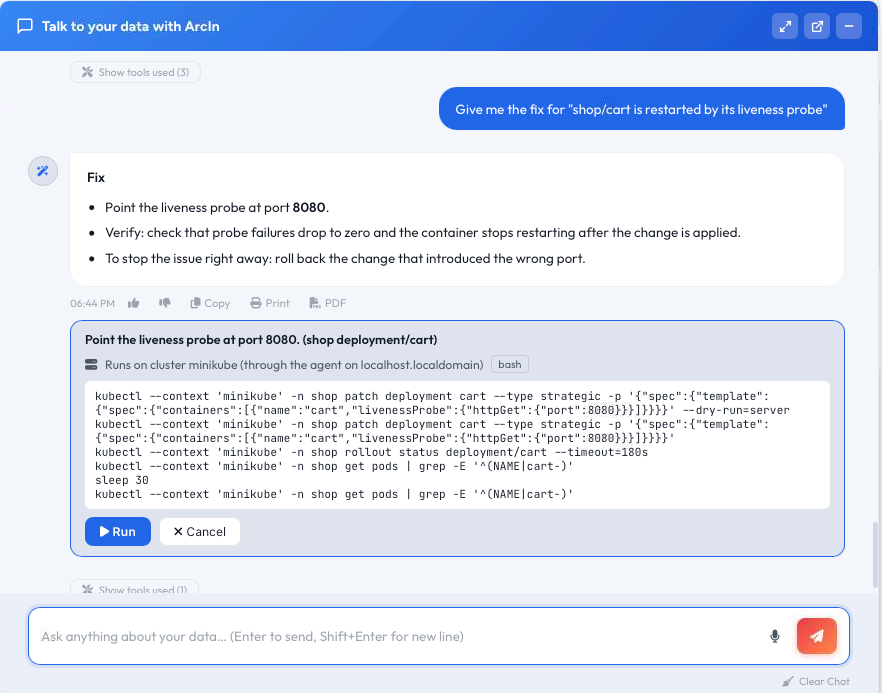
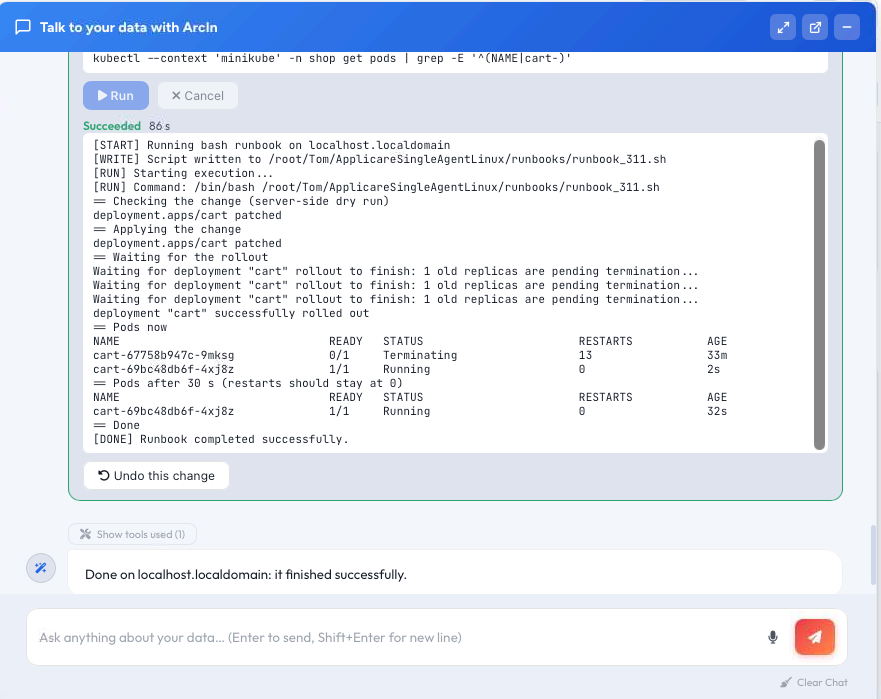
Recorded demo on a test cluster, shown here through ArcIn. Applicare's own automation follows the same approve, apply, verify steps without it.
Controls first, autonomy second.
Trusted by the DoD, the VA, AeroMexico, and banks and hospitals worldwide.
Read the stories: customers · root cause in 60 seconds · 94% fewer false positives · ArcIn
See it on your own systems.
The 48-hour health check puts Applicare on your estate and shows you what it finds, what it would fix, and what it could fix on its own. Or bring one incident your current tools handled badly, and we will work it live in 30 minutes.