The 502 nobody could find
How Applicare and its AI assistant ArcIn find a hidden cause of failed customer orders, explain it in plain words, and apply the exact fix in one click.
In short. A small share of customer orders fails at random with an error page. Every dashboard says the system is healthy, so teams usually restart, scale, and blame the network for days. The real cause is two timeout settings, owned by two different teams, that disagree. Applicare joins the evidence no single tool shows, names the cause with the numbers, and ArcIn applies the one-line fix, checks that it worked, and can undo it.
1. What the business sees
An online shop. Most of the time everything works. But every so often a customer clicks Place order and gets "502 Bad Gateway". Clicking again usually works, so most complaints are vague: "the site glitched". In our lab about one order in three failed; in production it is typically far rarer, one in a hundred or one in a thousand, which is exactly why it survives: rare enough to be dismissed as a blip, frequent enough to cost revenue, double-charge risk and trust every day.
2. Why good engineering teams miss it
This is not a careless-team problem. Every signal a team normally checks says "healthy":
| What the team checks | What it shows |
|---|---|
| The checkout service (restarts, CPU, memory) | Healthy |
| The checkout service's own error log | No errors |
| Browsing the catalogue | 100% successful |
| Load, latency, autoscaling | Normal |
| The front door (ingress) log | A few "connection reset" lines among millions of normal ones |
The failed orders never reach the checkout service, so it has nothing to report. The usual reactions, restarting it, scaling it up, raising timeouts, adding retries in the client, change nothing. A retried order can even be charged twice.
3. The real cause, in plain words
Between the customer and the checkout service sits the ingress, the cluster's front door. To be fast, it keeps the connection to the checkout service open after each request and reuses it for the next one.
- The ingress keeps an idle connection for 60 seconds (the default of ingress-nginx, the most common one).
- The checkout service closes an idle connection after 5 seconds (the default of popular application servers such as Node.js and uvicorn; gunicorn uses 2).
That single mismatch explains every odd symptom: only orders fail, the failures look random (they depend on pauses between clicks), and the checkout service looks perfectly healthy.
4. Isn't this covered by best practice?
Partly. The rule "the server must keep idle connections longer than the proxy in front of it" is documented by cloud and proxy vendors, and an experienced engineer who already suspects it can confirm it. It still reaches production regularly, for reasons best practice does not remove:
- The defaults disagree out of the box. Nobody has to make a mistake: installing a standard ingress in front of a standard application server creates the mismatch.
- Two teams own the two numbers. The platform team owns the ingress; each application team owns its server settings. A framework upgrade, a new service or a new load balancer quietly reopens it.
- Nothing alerts on it. There is no error rate to cross, no crash and no resource limit, just a trickle of failed orders.
- Knowing the rule is not finding the pair. In a cluster with hundreds of services, the hard part is knowing which service, behind which ingress, with which two numbers, and proving it.
So the value is not in knowing the rule. It is in noticing the problem early, proving which pair is wrong, and fixing it safely.
5. How Applicare finds it
Applicare collects the three pieces of evidence that are normally in three different places, and joins them automatically:
| Evidence | Where it comes from | What it proves |
|---|---|---|
| Failed orders, page views retried silently, connection resets | The ingress log, read every minute, per service | The failures happen on reused connections, not in the application |
| The checkout service's keep-alive time (5 s) | Its Kubernetes settings | The service closes connections early |
| The ingress keep-alive time (60 s) | The ingress configuration | The ingress holds them longer, so the two disagree |
When all three agree, Applicare opens a single problem card marked Confirmed, with the impact, the cause in plain words and the evidence behind it:

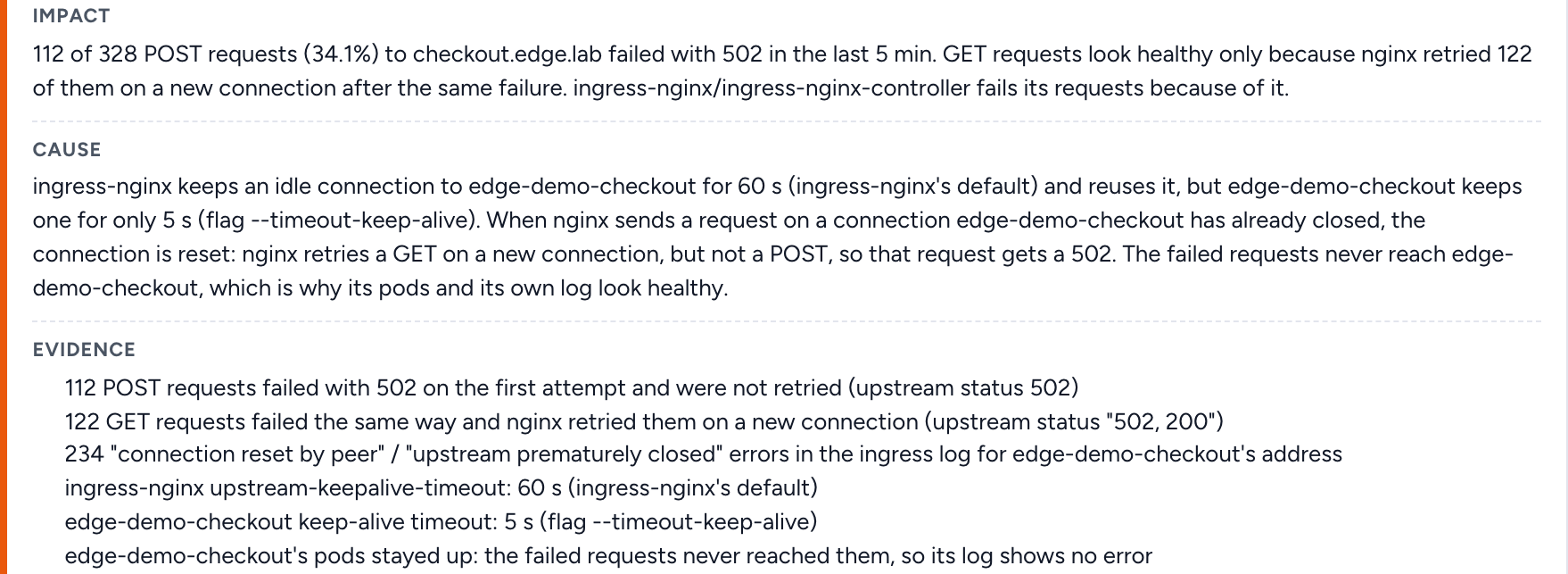
The card also says what will not help (restarting, scaling, retries), so no time is lost on the usual reactions. Side effects of the same fault, such as a misleading "slow" reading on the service or an error alarm on the ingress, are linked to this one cause instead of competing with it.
6. How ArcIn turns it into one click
ArcIn is the AI assistant built into the Applicare console. Anyone can ask in plain language, without knowing the cluster:
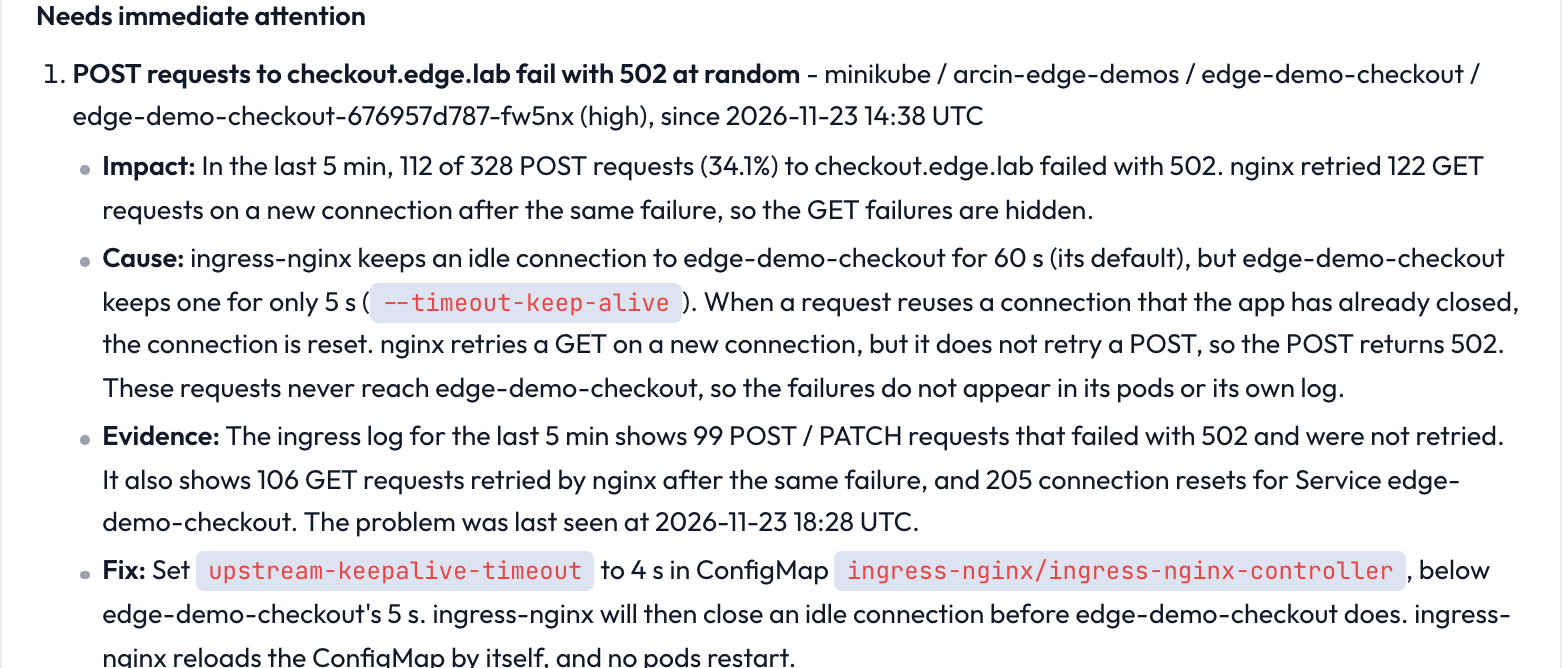
upstream-keepalive-timeout to 4 s in the ingress-nginx ConfigMap, below the checkout service's 5 s, so the ingress closes an idle connection before the service does.- It answers with the cause and the evidence, taken from Applicare's card and confirmed against the live data, usually within a minute or two. It understands that the web address named in the question belongs to the checkout service.
- It offers the exact fix as a Run card: one configuration change, shown in full before anything happens.
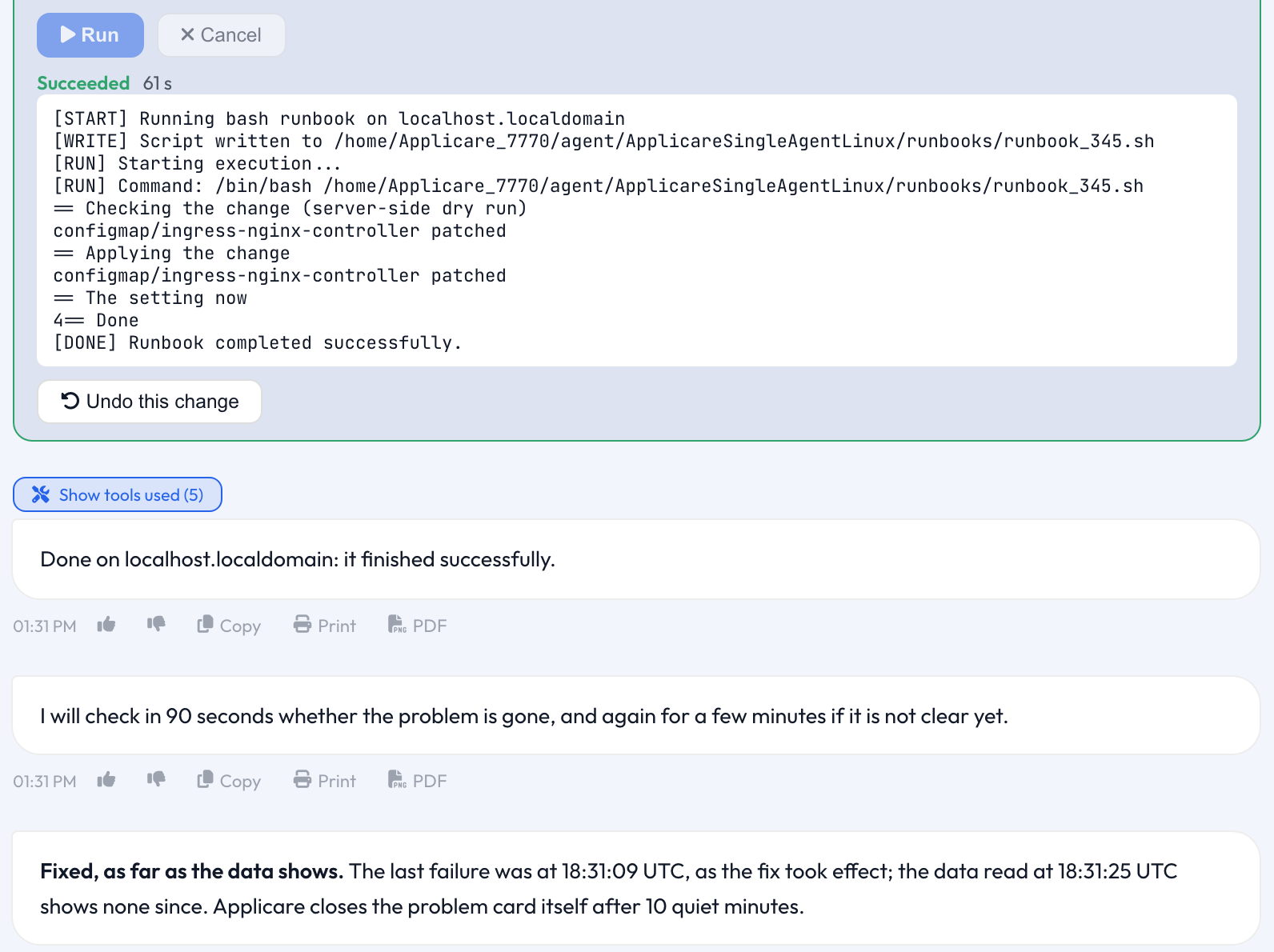
- An administrator presses Run. The change is first checked by Kubernetes without being applied (a "dry run"), then applied through the Applicare agent that already monitors the cluster. No one logs in to a server.
- ArcIn verifies the result itself about 90 seconds later: "Fixed, as far as the data shows. The last failure was at 18:31:09 UTC, as the fix took effect; none since."
- Undo is one click, and puts back exactly the previous setting. Every run is recorded.
7. Measured in our lab
8. What it means for the business
- Lost orders stop in minutes, not days. The time usually spent ruling things out disappears.
- No guesswork changes in production. No restarts, no scaling, no code change: one setting, proven by the evidence.
- Safe by design. Only administrators can run a fix; it is checked before it is applied, verified after, recorded, and can be undone.
- Knowledge that does not depend on one expert. Applicare recognises this pattern on every service, every day, and explains it to whoever asks.
About the demonstration: the shop traffic and the checkout service were simulated on a test Kubernetes cluster. In real systems the timing clash happens occasionally rather than on every quiet connection; the lab makes it frequent so it can be shown within minutes. A network device between the ingress and the service with a short idle timeout (for example a NAT gateway, firewall or cloud load balancer) produces the same symptoms, and the same fix applies. Figures quoted are from our lab runs on 23 November 2026.